You have probably heard that AI agents can now use websites for you. Book the meeting, fill out the form, check the order status. What most explanations skip is that an agent can do this in two very different ways, and the difference matters if your business has a website.
One way is a browser agent. It looks at a picture of your page, guesses where to click, clicks, takes another picture to see if it worked, and repeats. The other way is WebMCP. Your website tells the AI, "here is what I can do," and the AI asks for it directly. Same task, very different experience for you and your customers.
How each one works
A browser agent works in a loop. It captures the page, works out what is on it, clicks or types, then looks again to check the result. It repeats that loop for every single action.
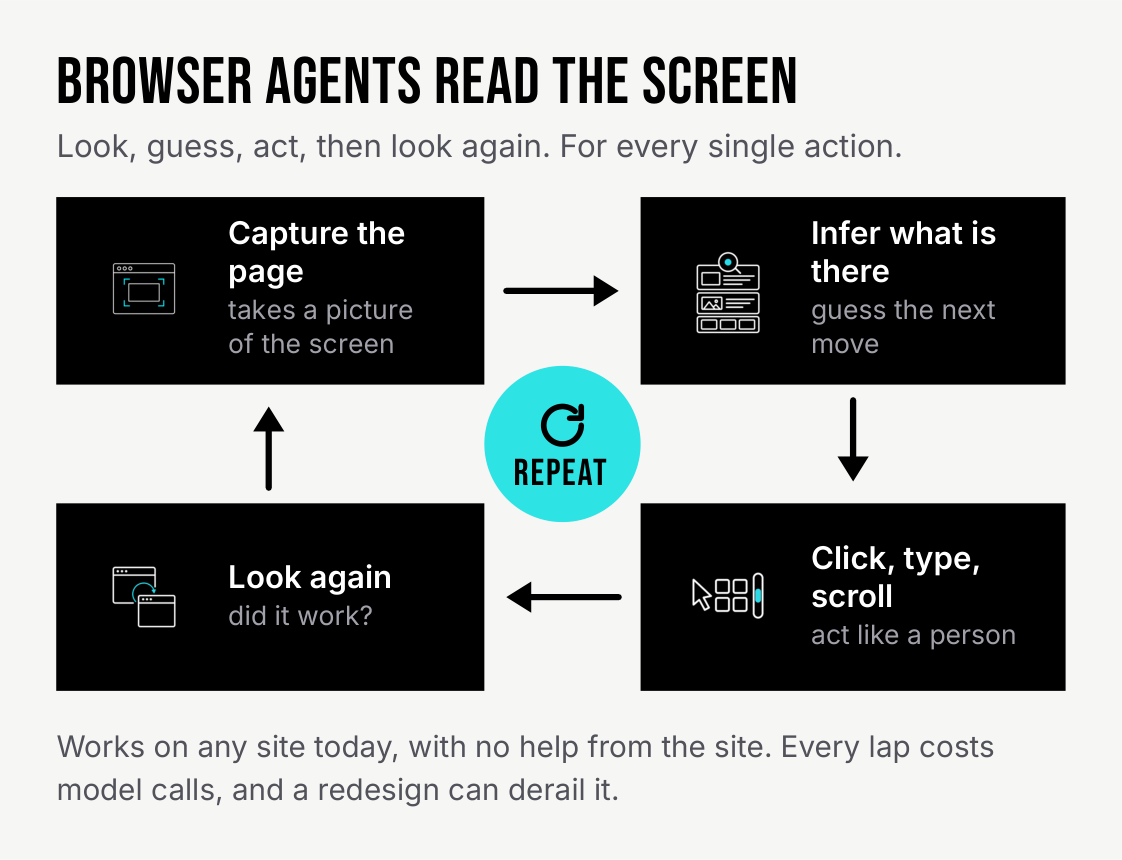
A browser agent repeats the same look, guess and click loop for every action.
WebMCP skips the guessing. Your site lists the tasks it can handle. The AI reads that list to learn exactly what each task needs, asks for the task directly and gets a clear result back.
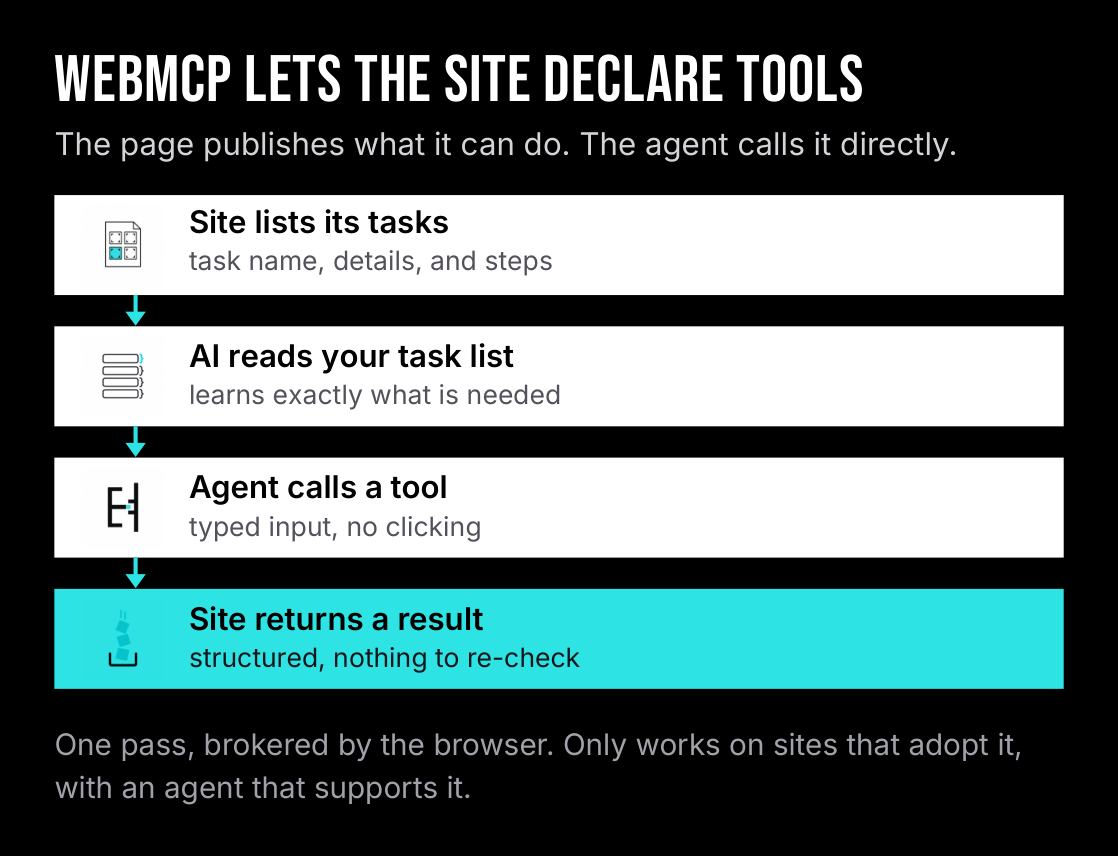
With WebMCP, the site hands the AI a task list, so the job gets done in one pass.
The flight example
Say you ask an AI agent to book a flight: JFK to Tampa, leaving November 14.
With a browser agent, the AI takes a picture of the airline's page, finds something that looks like the "From" field, clicks it, types "JFK," and takes another picture to check it worked. Then it does the same for the destination, the date picker, the passenger count and every pop-up along the way. Each of those steps costs AI processing, and a surprise pop-up or a moved button can send it back to square one. It is doing an impression of a very careful person with a mouse.
With WebMCP, the airline's site lists booking a flight as one of its tasks, along with what it needs: where you are leaving from, where you are going and the date. The AI sends one request with those three details.

Same task, two paths. The browser agent looks and clicks through every field. WebMCP books it in one request.
One request. The confirmation comes back in a clear format the AI can read right away. No screenshots, no guessing, no rechecking.
How they compare
Here is how the two approaches stack up on what a business owner cares about: cost, reliability, what happens when something goes wrong, and safety.
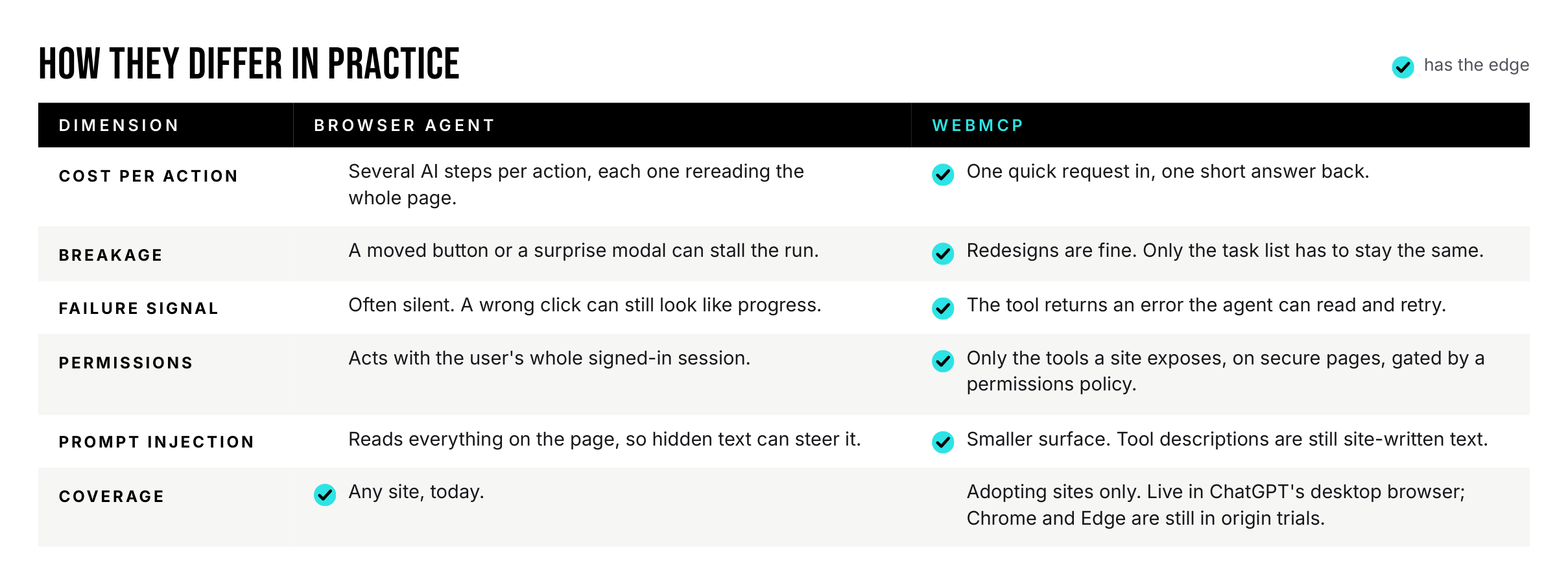
WebMCP has the edge everywhere except coverage, since it only works on sites that adopt it.
Why it matters for your business
AI assistants work better on your site. When your site lists its tasks, a customer's AI assistant can get an accurate quote, check a ticket status or book an appointment in one pass instead of stumbling through your forms. That means fewer abandoned bookings and fewer "your website confused my assistant" support emails.
It is safer. A browser agent acts with everything your customer is signed in to. A WebMCP site only offers the specific tasks you choose. Tasks that only look things up are marked that way, and anything that matters, like a booking, asks the person to confirm on the page first. That leaves less room for mistakes and for hidden text on a page that tries to trick the AI.
Nothing changes for regular visitors. Browsers and AI tools that do not use WebMCP simply ignore it. Your site works exactly the same for everyone else.
See it yourself
Reading about it is one thing. Watching both approaches side by side is another. We built a working demo using a fictional IT services company called Brightkeel IT. It lets you run the exact same request both ways, back to back.
Try the interactive demo: Brightkeel WebMCP Demo
How to use the demo
The demo takes about five minutes. Start with the two controls. At the top of the page, the Agent mode picker has two options: "Site tools (WebMCP)" and "Screen and clicks." In the panel on the right, the "Try a request" section has three ready-made requests: a price quote, a booking and a support status check.
Then follow these steps for each request:
-
Reset. Click "Reset" at the top of the page. This clears the conversation, the counters and any pending booking, so every run starts from the same place.
-
Run it with site tools. Set Agent mode to "Site tools (WebMCP)" and run the request. The AI reads the short list of what the site can do, picks the right task and finishes in one pass.
-
Reset again. Skipping this step is the easiest way to muddy the comparison.
-
Run it with screen and clicks. Switch Agent mode to "Screen and clicks" and run the same request. This time the AI takes a screenshot, guesses which numbered spot on the page to click, and rereads everything after each action. Watch the token counter climb. Tokens are how AI processing is measured, so a higher count means more work and more cost.
The ready-made requests are:
- Price out 40 people on the Secure plan with backup.
- Book a security review for Dana Lee, Harbor Dental Group, dan@example.com. First opening next week.
- What's the status of ticket BK-10517?
The difference speaks for itself. WebMCP finishes with one quick request and a summary you can read in a few seconds. Screen and clicks repeats its look, guess and click loop until the task lands or stalls. If you are showing this to a skeptic, start with the booking request. That is where the confirmation step and the AI's guesses run into real outcomes.
Where it stands
WebMCP is new. Google Chrome and Microsoft Edge are testing it now in early-access trials, and AI tools are starting to add support. The catch is adoption: it only helps on sites that list their tasks. The good news is that the work is small. The demo shows the code a site adds, and it reuses the pricing logic the page already has. The payoff starts with the first AI assistant that visits, and there is no downside while the rest of the market catches up.
Browser agents will always have a place, because they work on any site with no help from the site. But for your own website, the choice is simple: let every AI visitor squint at your pages and guess, or hand it a task list.
How do you get your website ready for AI assistants?
A discovery call is the easiest place to start. We look at what your customers most often do on your site, pick the one or two tasks worth offering to AI assistants first, and outline what it takes to add them.
Frequently asked questions
What is WebMCP in plain terms?
WebMCP is a way for your website to tell AI assistants exactly which tasks it can handle and what each one needs. Instead of guessing from what is on the screen, the AI asks for the task directly and gets a clear answer back.
Do I need WebMCP if my website already works fine?
Your site keeps working for people either way. WebMCP matters as more customers send AI assistants to get quotes, book appointments or check a status for them, because those visits go faster and fail less often on a site that lists its tasks.
Will adding WebMCP change my website for regular visitors?
No. Browsers and AI tools that do not use WebMCP simply ignore it, so everyone else sees and uses your site exactly as before.
Is WebMCP safe for my business?
It limits AI assistants to the tasks you choose to offer, and anything important, like a booking, asks the person to confirm on the page first. As with any new technology, it is worth reviewing which tasks you offer and what else runs on your site before you turn it on.
How much work is it to add WebMCP to a website?
For many sites, the starting point is small: a few tasks such as getting a quote, booking an appointment or checking a status, connected to logic your site already has. The exact effort depends on how your site is built and which tasks you want to offer.
Which browsers and AI tools support WebMCP today?
Google Chrome and Microsoft Edge are testing it in early-access trials, and AI tools are starting to add support. Because support is still growing, most businesses start with one or two high-value tasks rather than their whole site.