


Inside this article
- Agent RBAC is not user RBAC renamed. A user asks to see or change something. An agent takes action on its own, so its permissions have to answer several questions at once: what it can see, what it can only suggest, what it can execute, and what stays blocked no matter who invoked it.
- There are five practical strategies: static roles, least-privilege tool allowlisting, delegated on-behalf-of permissions, graduated autonomy, and just-in-time elevation. Most real systems combine a few of them.
- The strategy is only half the job. The other half is enforcement, and it belongs in the harness: Claude Code and Codex both ship permission systems you can configure today, and if you build your own harness, the policy layer is the part you own.
In the piece on agent harnesses, permissions showed up as one of the moving parts and then got waved past. In the piece on the verify step, the theme was proving an action happened after the fact. This article is about the layer in between: deciding what the agent is even allowed to attempt before it attempts it. That is access control, and for agents it works differently than the RBAC you already run for people.
Why Agent RBAC Is Not User RBAC
Traditional RBAC answers a simple question: can this person, in this role, see or change this thing? Read access, write access, on or off. You assign a role, the role carries permissions, and the person operates inside them.
An agent breaks that model in one specific way. A person decides, clicks, and lives with the result. An agent decides and acts in a loop, often dozens of times per task, with no human watching each step. So "can it change this" is no longer a toggle. It splits into a set of distinct questions: what context can it read, what can it draft without committing, what can it execute on its own, what requires a human signature, and what is off-limits even when the human who invoked it has full access.
That last one is the trap. The classic security failure here is the confused deputy: a low-privilege request that reaches a high-privilege tool through the agent, and the agent, holding broad credentials, carries out an action the requester could never have performed directly. Give an agent a master key "so it can get its work done" and you have not empowered the agent. You have handed every prompt that reaches it the master key.

The fix is not one setting. It is choosing an access-control strategy that matches the risk of the work, and then enforcing it in the harness rather than trusting the model to behave.
The Five Strategies
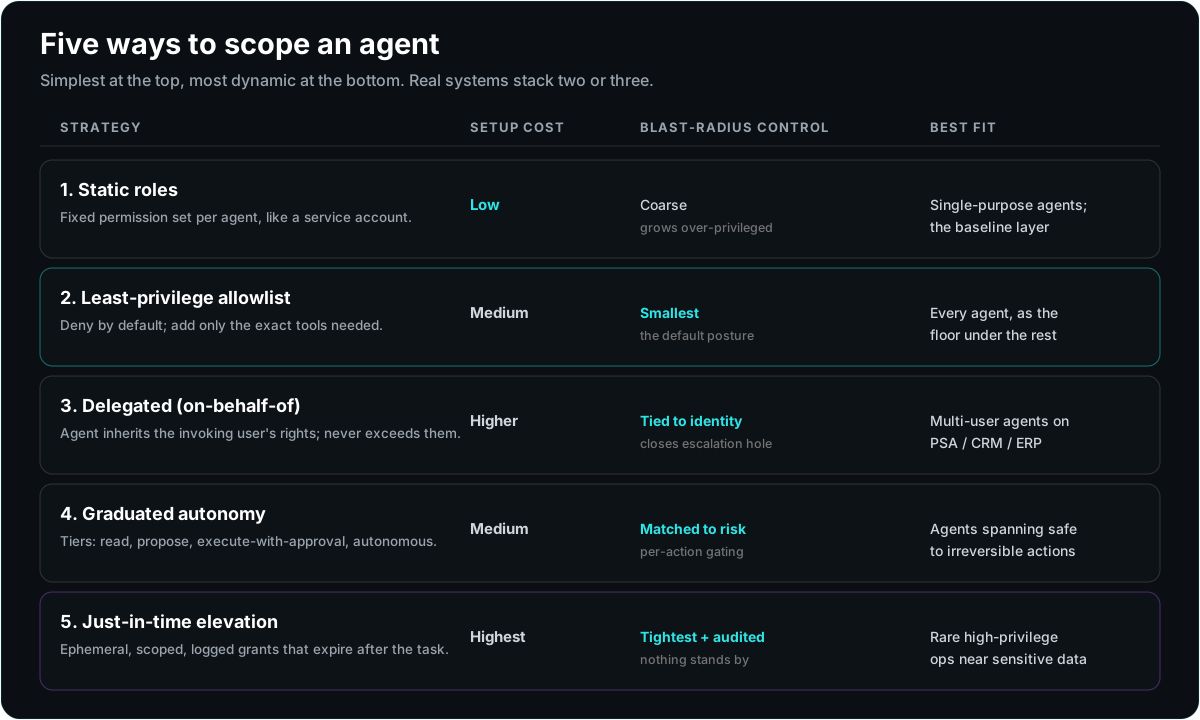
There are five patterns worth knowing. They are not mutually exclusive; a serious deployment usually stacks two or three. Here is the whole map before we walk each one.
1. Static Role Assignment
The agent is assigned a fixed role, and that role carries a fixed set of permissions, exactly like a service account. A "quoting agent" role can read the product catalog and draft quotes; a "reporting agent" role can read the data warehouse and nothing else.
When it fits: single-purpose agents with a stable job, and as the baseline layer under everything else. It is the easiest to reason about and the easiest to audit, because the permission set does not move.
Pros: simple, predictable, cheap to set up, trivial to review. Cons: coarse. A static role big enough to cover every case the agent might hit tends to grow until it is over-privileged, and it cannot tell the difference between a low-risk read and a high-risk write within the same job.
2. Least-Privilege Tool Allowlisting
Instead of granting a role and subtracting, you start from zero and add only the specific tools and actions the agent needs, denying everything else by default. The agent cannot call an API, run a command, or touch a file unless that exact capability is on the allowlist.
When it fits: almost always, as the posture you build every other strategy on top of. Deny-by-default is the single highest-leverage decision in agent security.
Pros: smallest blast radius, and the allowlist doubles as documentation of what the agent actually does. Cons: more upfront work to enumerate the needed tools, and it can generate friction when the agent legitimately needs something new mid-task. That friction is the point, but it has to be managed with a path to request more, not a temptation to open everything.
3. Delegated (On-Behalf-Of) Permissions
The agent does not carry its own broad rights. It inherits the permissions of the specific user who invoked it, and its effective access is the intersection of what the agent role allows and what that user is allowed to do. A rep who cannot approve a discount over a threshold cannot get that approval through the agent either.
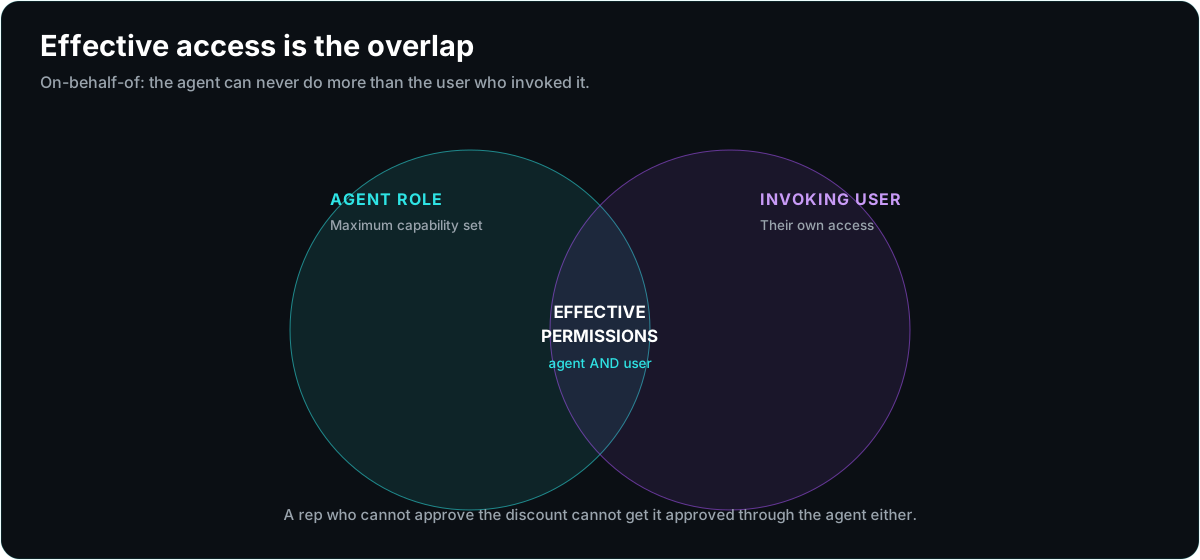
When it fits: multi-user agents that act inside systems where the human already has a permission model, such as a PSA, a CRM, or an ERP. This is how you stop the confused deputy: the agent can never exceed the caller.
Pros: closes the privilege-escalation hole, and access decisions ride on the identity system you already maintain. Cons: it requires real identity plumbing, so the agent knows who it is acting for and can resolve that user's rights at call time. It is more to build, and it is worth it anywhere the agent touches customer or financial data.
4. Graduated Autonomy (Capability Tiers)
Rather than a binary of allowed or blocked, actions are sorted into tiers of autonomy, and each tier is handled differently based on reversibility and cost.
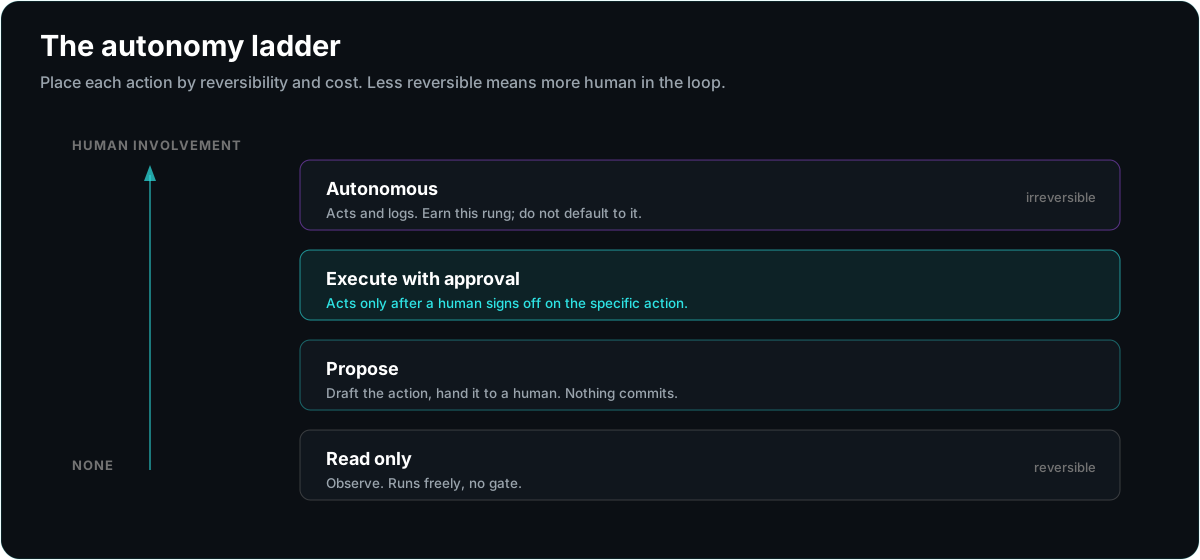
Read is free and automatic. Propose lets the agent draft a change and hand it to a human. Execute-with-approval lets it act, but only after a person signs off on the specific action. Autonomous lets it act and log. You place each action on the ladder by asking how reversible it is and how much it costs to be wrong.
When it fits: agents that span a range of actions from harmless to irreversible, which is most useful agents. Reading a ticket is a different risk than closing it; drafting a quote is different than sending it.
Pros: matches oversight to actual risk instead of gating everything or nothing, and it is how you earn trust incrementally, moving actions down the ladder as they prove reliable. Cons: you have to classify actions honestly, and the tempting mistake is promoting an action to autonomous because approvals are annoying rather than because it earned it.
5. Just-in-Time Elevation
The agent runs at a low baseline and requests elevated permission for a specific action, for a specific scope, for a limited window. The grant is ephemeral, tightly bounded, and logged, and it expires the moment the task is done.
When it fits: rare, high-privilege operations you do not want in the standing permission set, such as a one-time bulk update or a privileged data export. Also strong for anything you want a clean audit trail on.
Pros: the standing permission set stays small, and every elevated action leaves a record of what was granted, to whom, and why. Cons: the most machinery to build, and it needs a real approval and issuance path. Overkill for simple agents, essential for agents operating near sensitive systems at scale.
Which One Fits
You do not pick one. You start from least privilege as the floor, layer on the pattern that matches the work, and reserve the heavier machinery for the heavier risk.
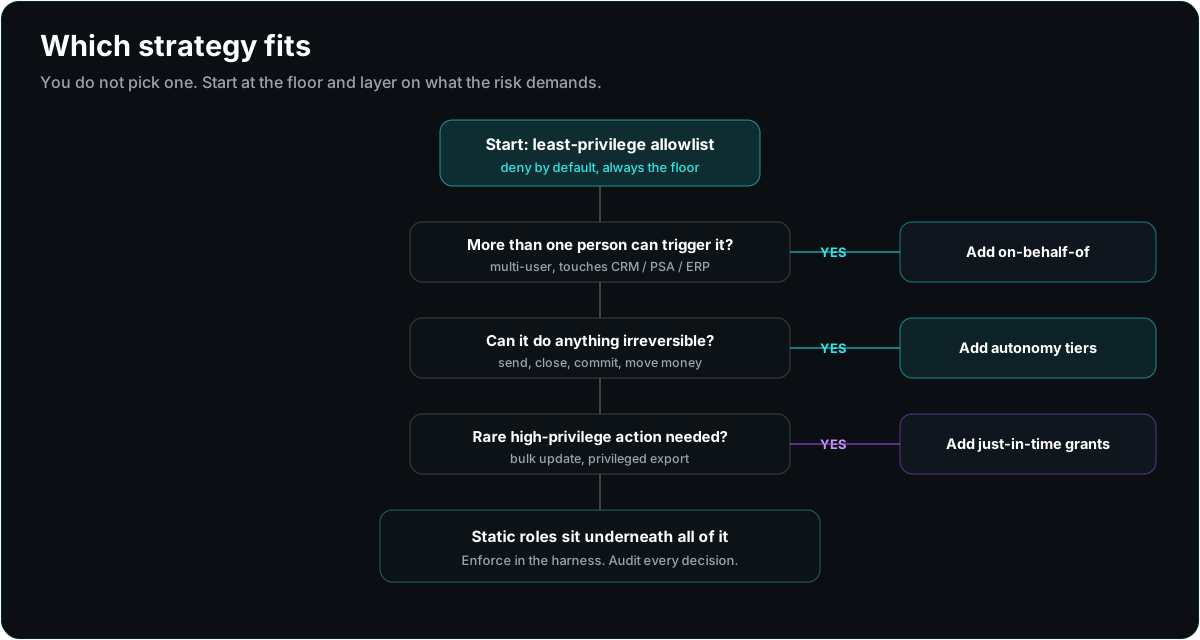
The short version: allowlist by default, always. Add on-behalf-of the moment more than one person can trigger the agent. Add autonomy tiers as soon as the agent can do anything irreversible. Reach for just-in-time elevation only when a rare, high-blast-radius action would otherwise force you to over-grant the whole agent.
Implementing It in Claude Code
Claude Code ships a permission system built on exactly these ideas, and you configure it in settings.json. The core is a permissions block with three lists written as tool patterns:
{
  "permissions": {
    "allow": ["Read(./src/**)", "Bash(npm run test:*)"],
    "ask": ["Bash(git push:*)"],
    "deny": ["Read(./.env)", "Bash(rm:*)", "WebFetch"],
    "defaultMode": "default",
    "additionalDirectories": []
  }
}
allow is what runs without asking, ask prompts for confirmation, and deny is the hard block that nothing overrides. Written this way, the allow list is your least-privilege allowlist (strategy 2), the deny list encodes the actions that stay blocked regardless of context, and ask is graduated autonomy (strategy 4) expressed as an approval gate on the risky commands. The session-wide posture is the permission mode: default, acceptEdits, plan for read-and-plan-only, and bypassPermissions for the "I know what I am doing" escape hatch you keep out of production.
Two details matter for real deployments. First, settings resolve across scopes, and a managed enterprise policy file wins over project and user settings, which is how an organization pins deny rules that a developer cannot loosen. Second, PreToolUse hooks let you run your own code before a tool call and approve or block it programmatically, which is where you implement delegated permissions and just-in-time elevation that a static list cannot express. MCP servers are scoped the same way, so an agent only reaches the external systems you connect.
Implementing It in Codex
Codex approaches the same problem through two dials, approval policy and sandboxing, configured in config.toml under $CODEX_HOME:
approval_policy = "on-request"
sandbox_mode   = "workspace-write"

[sandbox_workspace_write]
network_access = false
writable_roots = ["/path/to/project"]
sandbox_mode is your blast-radius control: read-only observes and plans, workspace-write can edit inside declared roots but asks before reaching the network or writing outside them, and danger-full-access removes the sandbox entirely. approval_policy decides when Codex pauses for a human: untrusted, on-failure, on-request, or never. Put together, read-only with prompting is graduated autonomy at the "propose" rung, and workspace-write with approvals is the "execute with approval" rung. Even in workspace-write, sensitive paths like .git/ stay read-only by default, so a commit still surfaces for approval.
For organization-wide control, Codex reads a requirements.toml that can forbid the dangerous settings outright, for example disallowing approval_policy = "never" or sandbox_mode = "danger-full-access" on managed machines. That is your enterprise deny layer. Profiles let you keep several named configurations side by side and select one per task, which is a clean way to run a tight profile for anything customer-facing and a looser one for scratch work.
Building It Into Your Own Harness
If you are not using an off-the-shelf CLI, the same access control has to live somewhere in your harness, and the right place is a policy layer that sits between the agent loop and the tools. Every tool call the model wants to make passes through it before anything executes.
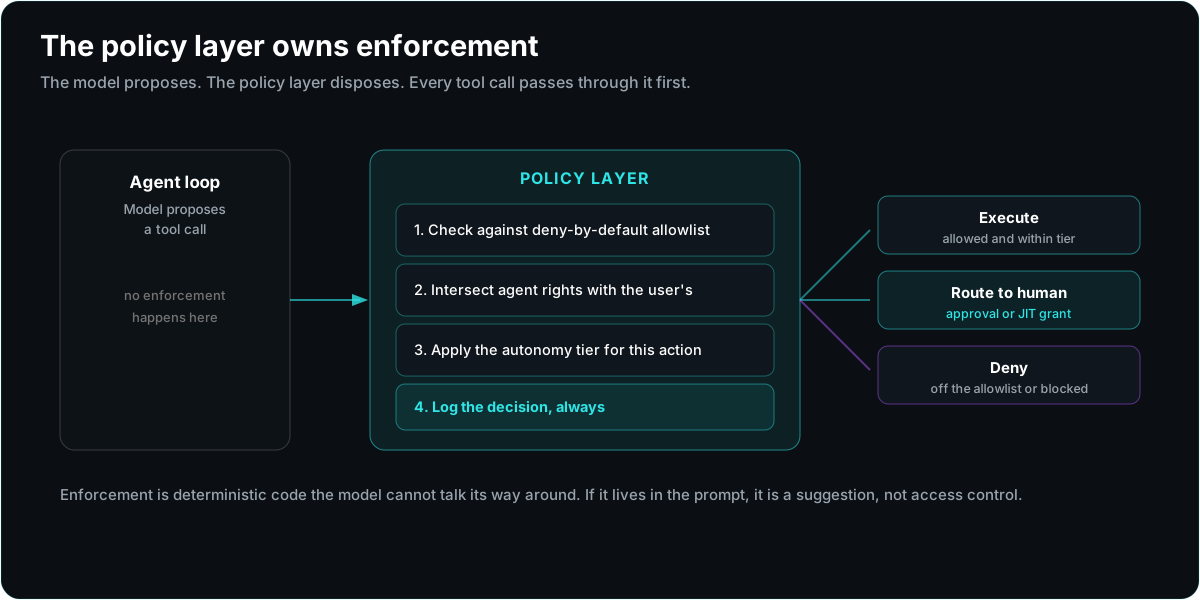
The layer does four things in order. It checks the requested call against a deny-by-default allowlist. It resolves the invoking user and intersects their rights with the agent's, so the effective permission never exceeds the caller. It looks up the autonomy tier for that action and either runs it, routes it to a human, or requests a just-in-time grant. And it writes every decision, allowed or denied, to an audit log that names the agent, the user, the action, and the outcome.
The critical design rule is that the model never enforces its own permissions. The model proposes; the policy layer disposes. If the only thing stopping an agent from wiring money is a line in the prompt asking it not to, you do not have access control, you have a suggestion. Enforcement has to be deterministic code the model cannot talk its way around, on the same principle as the verify step: the trustworthy part of the system is the part the model does not control.
What This Looks Like in the Channel
Make it concrete for the work we actually do. A quoting agent runs on-behalf-of the rep, so it can never approve a discount the rep could not; drafting the quote is autonomous, but sending it to the customer sits at execute-with-approval. A ticketing agent has an allowlist that lets it read and update tickets in the PSA and nothing else, with status changes on irreversible tickets gated by a human. An MDF or co-op agent that pulls partner funds data reads on-behalf-of the program manager, and any action that moves or commits money requires a just-in-time grant and a signature, every time.
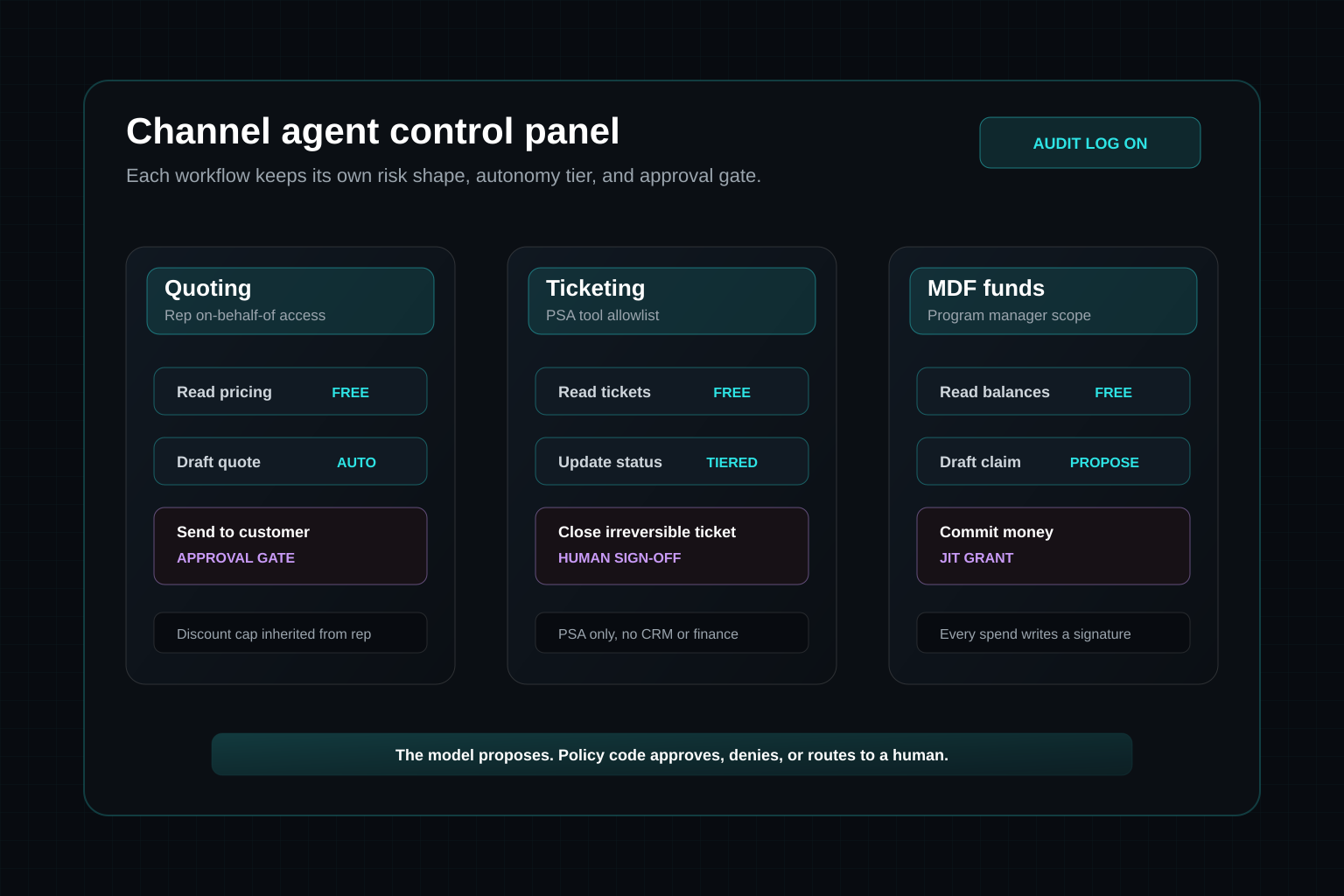
None of that comes from picking a smarter model. It comes from someone mapping the workflow, deciding which of the five strategies fits each action, and wiring the enforcement into the harness. That mapping is the deliverable. It is AI implementation: the unglamorous, load-bearing work of deciding, precisely, what the agent is allowed to do before you ever let it near a customer's quote, ticket, or funds.
If you are evaluating an agent to put near real work, ask the access-control question before the model question: what can this agent do on its own, what can it do only for the specific user who asked, what does it have to get a human to sign, and what can it never do at all? If those four answers are enforced in code and written to a log, you have RBAC. If they live in a prompt, you have a hope.