Inside this article
- The PSA stays the system of record. Agents work on a copy of the data, and a person approves what goes back.
- What each agent may read and change is a decision you make, with three possible outcomes for every action: allowed, needs approval or denied.
- Where no connector exists, one can be built, and where a vendor portal offers nothing to connect to, an agent can work through its pages the way a person would.
For an MSP, the PSA is where the business lives. Tickets, time, agreements, configurations and invoices all sit in it or pass through it. So when someone proposes adding AI agents to service delivery, the first worry is sensible: does this mean replacing the PSA, or letting software loose inside it?
It means neither. This article explains how agents can do useful work on PSA data while the PSA stays exactly where it is.
Why not replace the PSA with something built for AI?
Because the PSA is the system of record, and the value of a system of record is that everyone trusts it. Billing runs from it. Reports come from it. Technicians know where to look.
Replacing it is a migration project with its own risk and its own cost, and it delays the result you wanted in the first place. Much of the time spent in service delivery goes on the work around the ticket: reading it, classifying it, finding the history, writing the update, chasing the next step. An agent can take on that work without the ticket ever living anywhere else.
The better goal is narrower. Let agents reach the PSA, with limits, and leave the PSA in charge of the record.
What does it mean to connect an agent to a PSA?
Three things have to be true.
The agent can see the records it needs. For ticket work that usually means tickets, companies, contacts and the history attached to them. In PRESHos this is done by Connectors, which sync records with the systems you run, mapped field by field.
The direction of sync is chosen for each kind of record. Some records only need to come in so the agent can read them. Others need to go back.
Every action can be traced. If a ticket's priority changed, you can see who did it, which agent, which tools and what changed.
A connection that only reads is a search tool. A connection that writes with no limits is a risk. The useful ground is in between, and the next two sections describe it.
How does a ticket move through an agent while the PSA stays in control?
Agents do not work directly on your live PSA. They work on a copy of the data, and there is a gate before anything goes back.
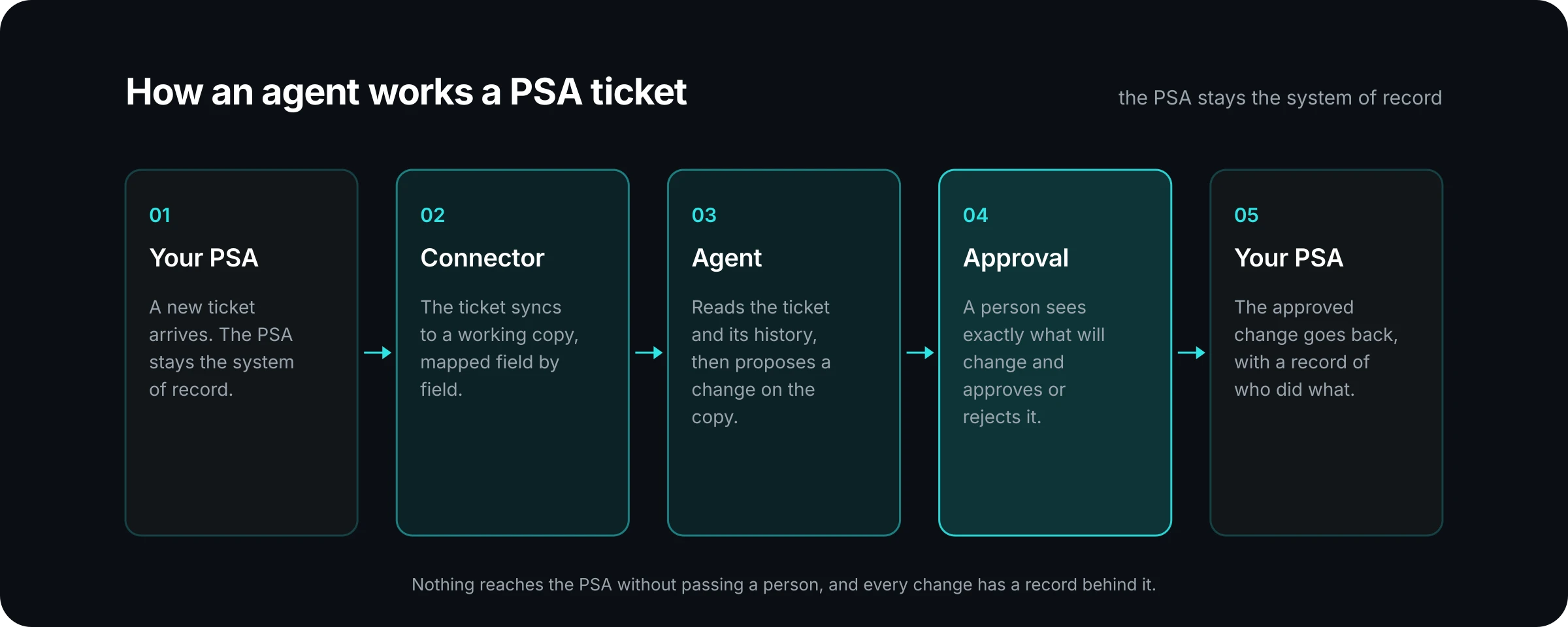
Take a new ticket that arrives by email with a vague subject line. The connector brings it into the working copy. The agent reads it, looks at the company's past tickets, and proposes a type, a priority and a queue, with a short note explaining why. That proposal waits in an approval inbox. The dispatcher sees exactly what will change, and approves or rejects it. Only then does the change go back to the PSA.
PRESHos calls the working copy a digital twin. Your live systems stay the system of record. The copy is where agents do the work. A person decides what goes back, and when. The integration page shows how this fits into a build.
Who decides what the agent may read and change?
You do. In a PRESHai build this is the decision that belongs to you in the Connect phase, and it is made before any workflow is built on top.
It helps to write it as a table. For each agent, every action has one of three outcomes: it is allowed, it needs approval, or it is denied.
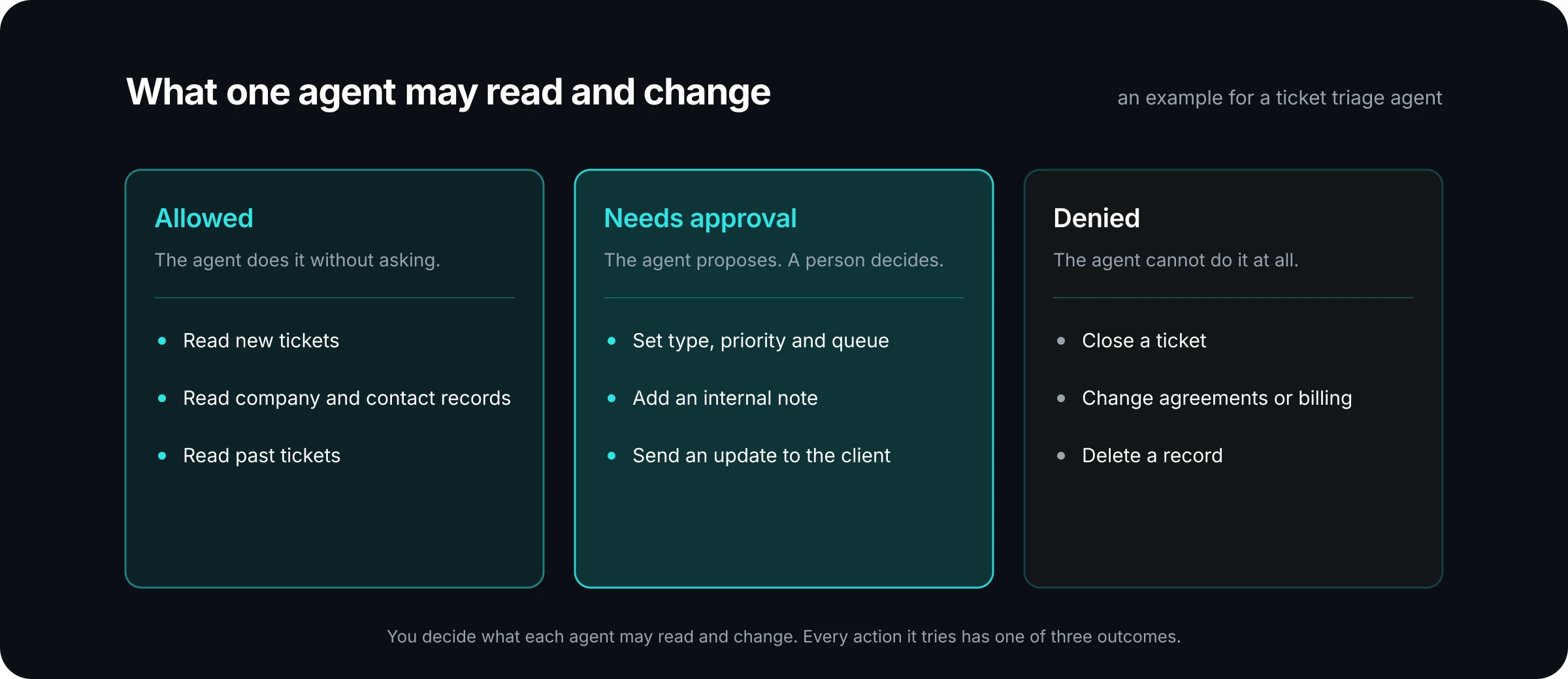
The example above is for a triage agent. Reading is allowed. Changing a ticket's routing needs a person. Closing tickets, touching agreements or billing, and deleting records are denied, because none of them is part of triage.
Two principles keep the table short. Give each agent a role, the way a person has a role, and scope it to the job. And never give an agent more access than the person who owns it.
Over time you may move some actions from "needs approval" to "allowed" as the team sees how the agent performs. That is a decision for the workflow owner to make with evidence, and it is easy to make when the record of past approvals is in front of them.
What if a system has no connector?
MSPs run more than a PSA. There are documentation tools, security consoles, vendor and distributor portals, and usually one or two systems nobody else has heard of.
There are two answers. Where a connector does not exist yet, one can be built. PRESHai builds these with the PRESHos connector SDK as part of the implementation. Where a vendor or distributor portal has nothing to build a connection on, an agent can work through its pages the way a person would.
Either way, the same limits apply. The agent has a role, its changes wait for approval, and its actions are recorded.
What should always stay with a person?
A useful starting rule: anything a client will read, anything that changes money, and anything that cannot be undone.
In practice that covers client-facing updates, changes to agreements and invoices, and closing or deleting records. The agent can prepare all of these. A technician, an account manager or a finance lead makes the call.
This also makes adoption easier. The work arrives done and ready for review, and the habit your team learns is checking and approving it. That is a smaller change than asking people to prompt an assistant from a blank box.
How do you know what the agent did?
Ask for two kinds of record.
The first is the audit record: for each change, who did it, which agent, which tools and what changed. This is what you show a client or an auditor who asks how a ticket ended up where it did.
The second is the run record. In PRESHos, Runs keep each piece of agent work with its steps and its cost, so a change can be traced and rolled back, and so you can see what the workflow costs per task.
If a proposed integration cannot produce both, it is not ready to write to your PSA.
Where to start
Choose one ticket workflow, such as intake and routing. List the records the agent needs to read and the fields it would change. Sort every action into allowed, needs approval or denied. Name the person who will approve.
That page of notes is most of an integration brief. If you want help turning it into a build, tell us the systems your agents need to reach. We will talk through what connects today and what we would build.