
Inside this article
- A field-level permission controls one field on a record, such as the margin on a deal. It lets an agent work with a record without seeing or changing every part of it.
- Permissions are built in layers: the object, the action, the scope and then the field. Agents hold roles the same way people do, and an agent never has more access than its owner.
- Good field rules start from the job. List the fields the agent must read, the few it may update, and leave the rest out.
Most access questions about agents are asked at the wrong size. "Can the agent see deals?" is a yes or no question, and the honest answer is usually "some of each deal". The agent needs the stage and the close date. It has no reason to see the margin.
Field-level permissions let you give that answer. This article explains what they are, how they fit with roles and scopes, and how to design them for a first agent. The examples use PRESHos, and the method applies to any platform with role-based access.
What is a field-level permission?
A record is made of fields. A company record has a name, an address, an account owner and a credit status. A deal has a stage, an amount and a margin. A ticket has a summary, a priority and internal notes.
An object-level permission covers the whole record: this role can read deals. A field-level permission covers one field on it: this role can read deals, and it cannot read the margin field.
In PRESHos, roles for people and for agents go down to the field. Field permissions cover two actions, reading a field and updating it. That is enough to express the three states that matter in practice: the agent can read and update the field, it can read the field only, or the field is hidden from it.
How do roles, scopes and fields fit together?
Think of permissions as four questions, asked in order.
Which object? Companies, deals, projects, tasks and so on.
Which action? Create, read, update or delete.
Which records? This is the scope. In PRESHos, each action is granted for a person's own records, their team's records or the whole organisation's.
Which fields? Within the records the role can reach, which fields it can read and which it can update.
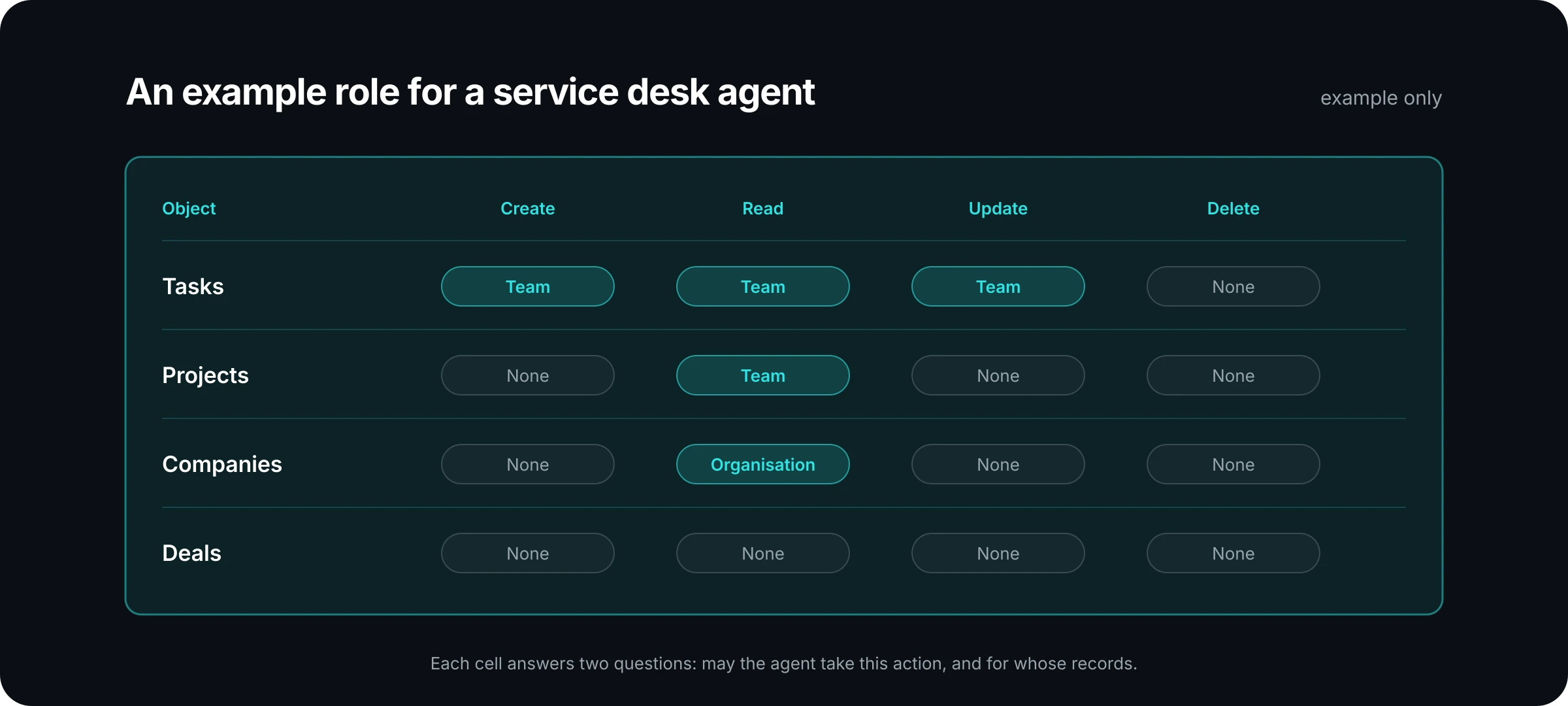
The grid above is an example role, drawn the way the role settings in PRESHos lay it out: objects down the side, actions across the top, and a scope in each cell. Field rules then sit inside the cells that grant access. The governance page shows the real screen.
How does an agent get its permissions?
Agents hold roles too. How an agent gets them depends on its type.
A personal agent acts as its owner, with the owner's access. Its field access is exactly its owner's. If the owner cannot see margin, the agent cannot see margin. There is nothing extra to configure and nothing extra to audit.
A team agent acts as itself, with its own assigned roles. This is where field-level design earns its keep. You can write a role for the agent that is narrower than the roles of the people who use it. A quoting agent that serves the whole sales team does not need everything a sales director can see.
Both types sit under the same rule: an agent never has more access than its owner. The agents page describes the two types side by side.
What happens when no field rule is set?
The field follows the object. If a role can update deals and nobody has written a rule for the stage field, the role can update the stage. Field rules are exceptions you add where a field needs tighter handling than the record around it.
Two more behaviours are worth knowing.
First, a deny wins. If a member holds several roles and one of them denies an action, the action is denied. You do not have to hunt for a more generous role that might override it.
Second, permission is only one of the checks. Whether an action goes ahead also depends on tool policy, and each action ends in one of three outcomes: it is allowed, it is sent for approval, or it is denied. An agent might have permission to update a field and still need a person to approve the change before it reaches a live system.
What does this look like on a real record?
Here is an example. A solution provider has a team agent that prepares quote drafts. Account managers ask it for a first draft, then review and send the quote themselves.
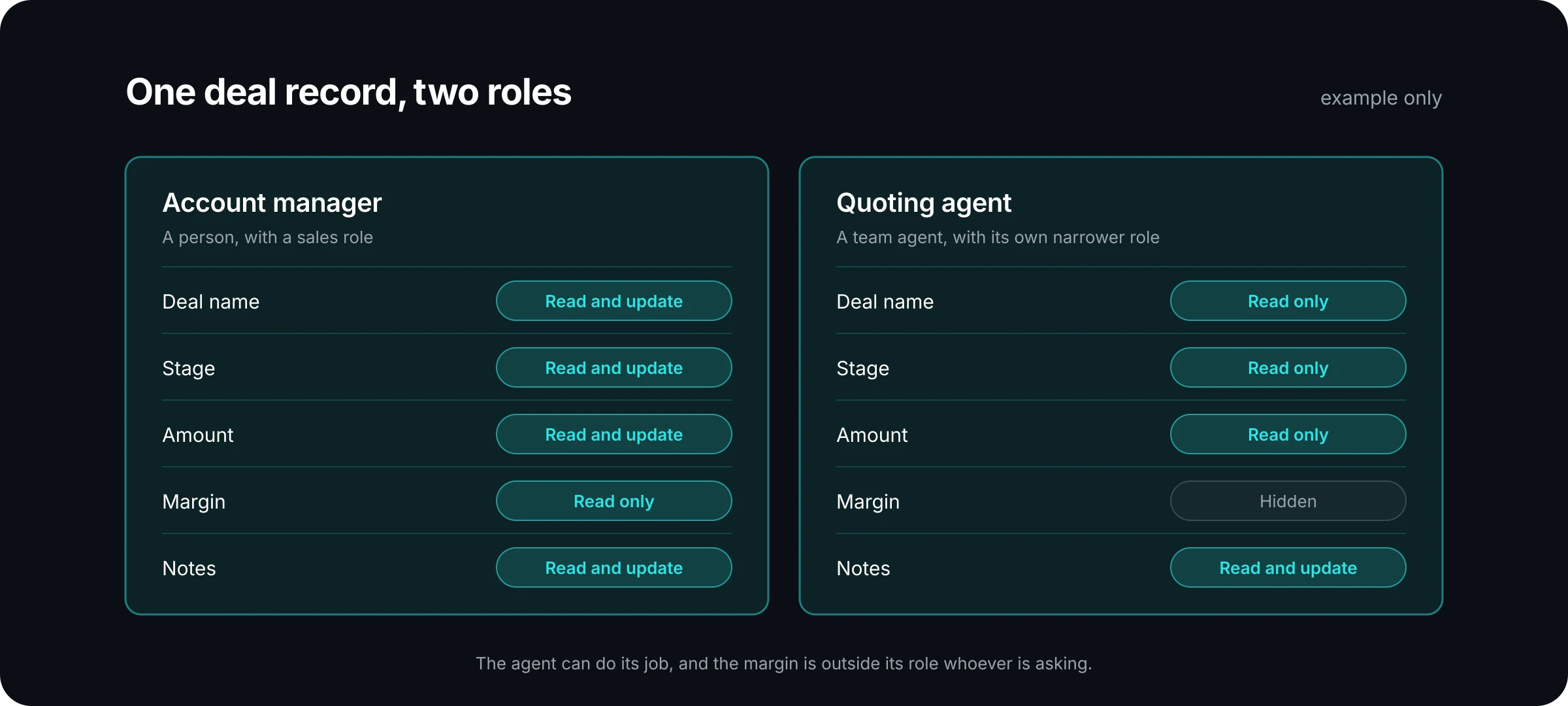
The account manager can read and update most of the deal and can read the margin. The agent has its own, narrower role. It reads the name, stage and amount, because it needs them to build the draft. It can update the notes field, because that is where it reports what it prepared. It cannot see the margin at all.
Three things follow from that design. The agent can do its job. A prompt that asks the agent for the margin gets nothing, because the field is outside its role, whoever is asking. And the audit question has a short answer: the agent's role is one page, and every field on it has a reason.
How should you design field rules for a first agent?
Work from the job outward.
Write down the task in one sentence. "Draft a quote from an open deal" is enough.
List the fields the agent must read to do it. Be specific. "The deal" is too broad. "Name, stage, amount, products and close date" is a list you can check.
List the fields it must update. This list should be short. Many agents need to update one or two fields and propose everything else for approval.
Mark the sensitive fields on the same records. Margin, cost, credit status, internal notes and personal contact details are common ones. Decide for each whether the agent reads it, or whether it is hidden.
Choose the scope. An agent for one team rarely needs records across the whole organisation.
Then test with the agent's own identity. Ask it for something it should not have, and confirm that it is refused.
Review the role when the job changes. Permissions that were right for drafting quotes are not automatically right for sending them.
Where this fits
Field-level permissions are one layer. Identity decides who the agent is. Roles and scopes decide which records it reaches. Field rules decide which parts of those records it can read and change. Tool policy and approvals decide what happens when it acts. The security page lists each control, area by area.
None of this requires a special security model for AI. It is the access control you already understand, applied to a new kind of colleague, at the level of detail that the work calls for.
If you are scoping a first agent and want a second pair of eyes on its role, talk to us. We will go through the fields with you.