Inside this article
- A session is the workspace where an agent does one job. In PRESHos, every cloud session runs in its own isolated virtual machine.
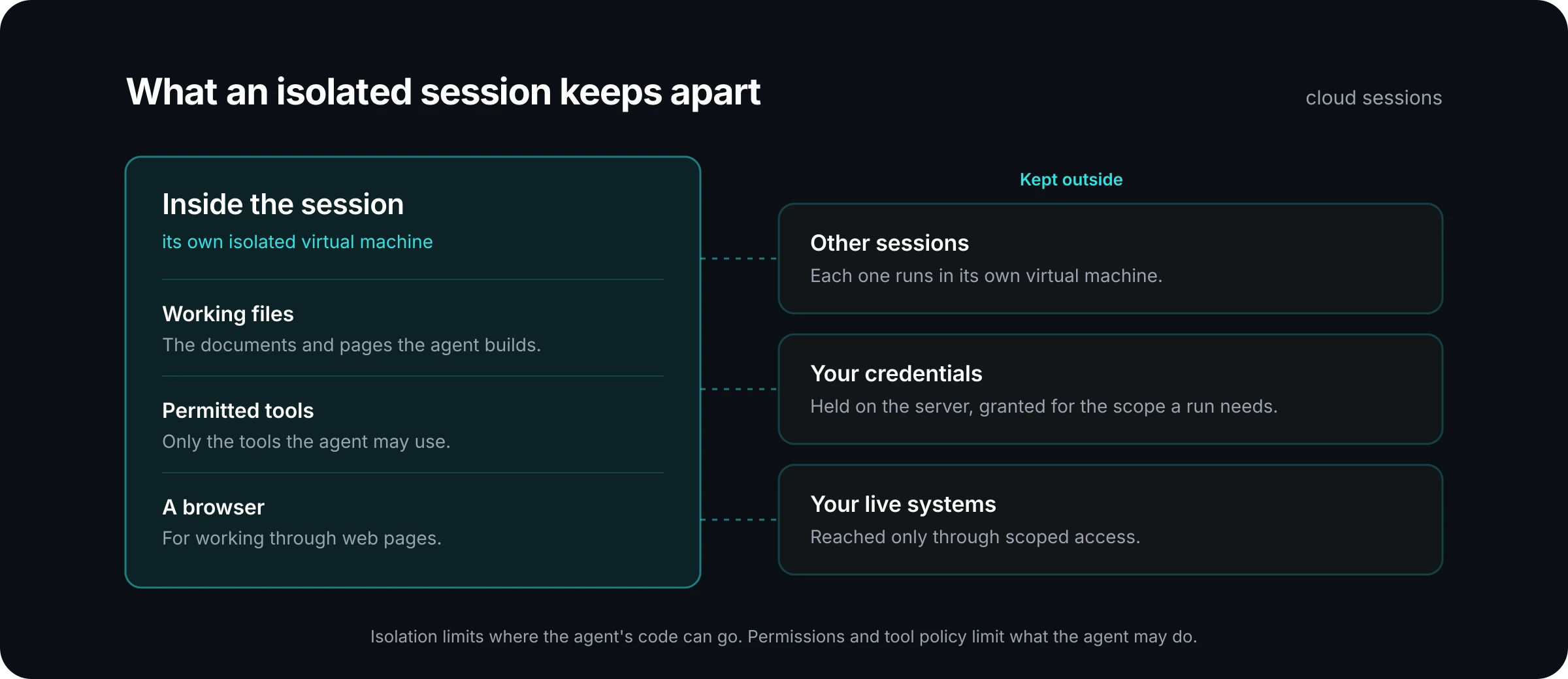
- Isolation is about what the session keeps apart: other sessions, your credentials and your live systems. The agent reaches those only through controlled paths.
- A session can also run on a user's own desktop. That is a different boundary, with its own rules, and it is worth knowing which one a job is using.
When an AI agent "does" something, such as writing a report, filling in a form or checking a web page, that work happens on a real computer somewhere. Most people never ask where. Security and IT leaders should, because the answer decides what the agent can touch if something goes wrong.
This article explains where agents run in PRESHos, what "isolated" means in practice, and the questions to ask of any agent platform.
What is a session?
A session is the place where an agent does a piece of work. You hand the agent a job. It plans the work, does it in its own session and hands back the result with the files ready for review.
A session holds three things: the conversation between you and the agent, the tools the agent is permitted to use, and a workspace for files. The documents, pages and files the agent produces are built in the session and open beside the conversation, so you can review them where they were made.
Sessions are also durable. The conversation and the files are kept, so a piece of work can be picked up again later.
What does "isolated" mean here?
It means the session has its own computer, and that computer is not shared.
In PRESHos, every cloud session runs in its own isolated virtual machine. A virtual machine is a complete computer, created in software, with its own operating system, its own files and its own memory. The kind used for agent sessions is small and quick to start, which is why you will see the term microVM.
The practical effect is separation. One session cannot read another session's files. A script that an agent runs in one session has no path to the session next door. If an agent is given a web page containing hostile instructions and something does go wrong, the separate workspace limits how far the problem can spread.
Compare that with running agent tools on a shared server, where every job sits in the same environment and a mistake in one can reach the others. Isolation per session removes that shared surface.
What can the agent reach from inside a session?
An agent that could reach nothing would be safe and useless. The point of the design is that everything the agent reaches goes through a path someone controls.
Its own workspace. The agent can create and edit files in its session. That is where reports and drafts take shape.
The web. Agents browse the web and work through pages the way a person would. Outbound access from cloud sessions is configurable, so an administrator can decide what the session may reach. There are also safeguards against a known trick called server-side request forgery, where a request is steered toward internal addresses it should never touch.
Your connected systems. The agent reaches your CRM, PSA and other systems through connectors and tools, with scoped access. It gets the access its role and tool policy allow.
AI models. Model calls leave the session through the same kind of scoped path.
Every one of those requests is checked. Role permissions and tool policy decide whether an action is allowed, sent for approval or denied. Isolation limits where the agent's code can go. Permissions limit what the agent may do. You want both. The security page lists the controls, area by area.
Where are credentials kept?
On the server, outside the session. This is one of the most useful things to understand about a well-built agent runtime.
A common worry is that an agent holding an API key could leak it, or be talked into revealing it. The answer is to keep the secret away from the agent. In PRESHos, credentials are held in a secrets vault and granted to a run only for the scope it needs. They stay on the server. When an agent uses a connected system, it asks for an action, and the platform carries out the call with the credential on the agent's behalf.
The agent gets the result of the action. It does not get the key.
What is different about a session on your own desktop?
Some work belongs on a person's own machine: a desktop application with no API, or files that live in a local folder. PRESHos offers a second place to run for that.
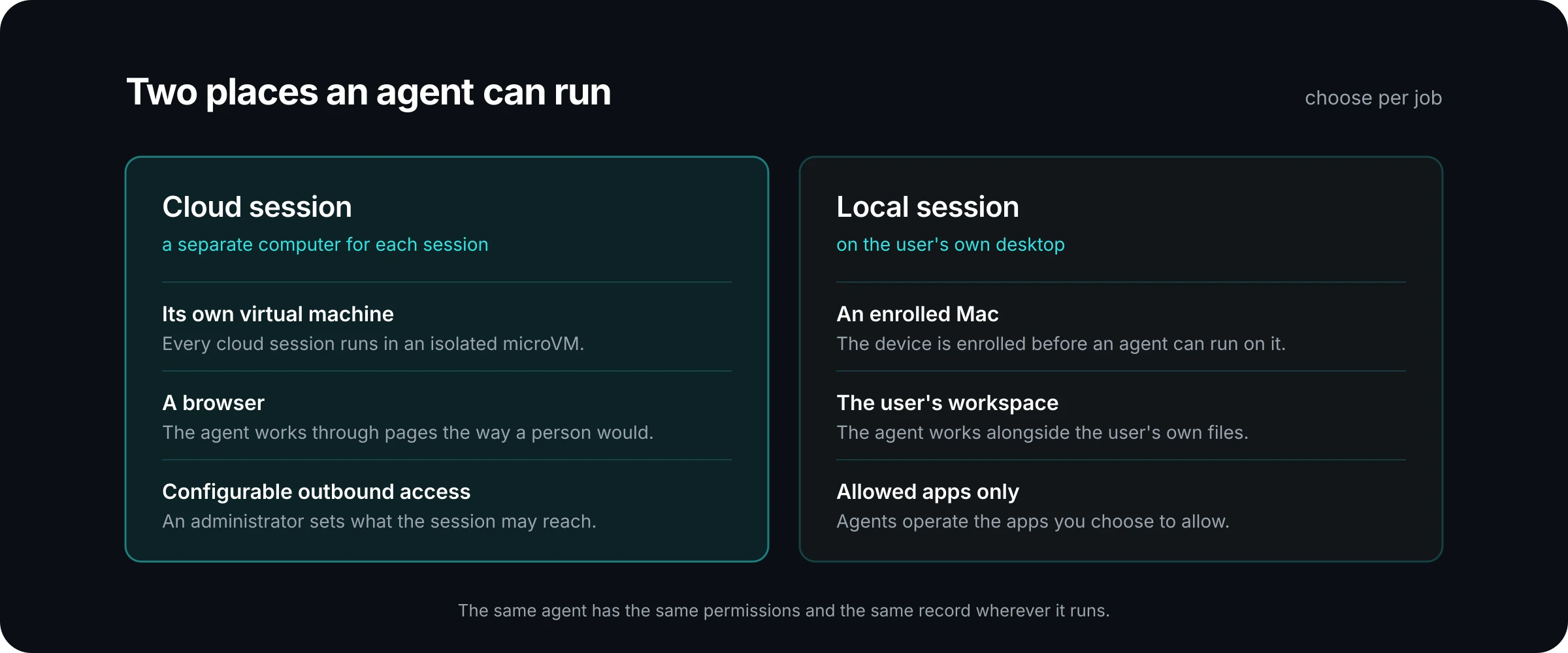
A local session runs on an enrolled Mac, in the user's workspace. On the desktop, agents operate the apps you choose to allow.
It is important to be clear about the difference. A cloud session is a separate virtual machine. A local session works on the user's own computer, alongside their own files and applications. The boundary there is the enrolment of the device, the workspace the user selects and the list of apps you allow. It is a lighter kind of separation than a virtual machine provides.
Here is an example of how a team might split the work. An MSP uses cloud sessions for anything that involves the open web or unfamiliar files, such as researching a vendor or processing an inbound document. It uses local sessions for a billing clerk's agent that needs to work in a desktop accounting application that has no other way in. Each job runs where its risk is best contained.
What does not change is the governance. The same agent has the same permissions and the same record however you reach it. The agents page covers both places to run.
What is left when the session ends?
The record. A run leaves evidence that outlasts the workspace it ran in: run and tool event traces, human approval records, and the actor, action and outcome for each.
That matters for two reasons. If something needs investigating, you can follow the steps the agent took and the tools it used. And if someone asks who approved a change, the approval is on the record with a name. The governance page shows how the audit record and approvals fit together.
What should a security reviewer ask?
These questions work for any agent platform, including ours:
- Does each session get its own environment, or do sessions share one?
- What can a session reach on the network, and who configures that?
- Where are credentials stored, and can the agent's code read them?
- If an agent runs on a user's desktop, which apps can it operate, and who decides?
- Is the same permission check applied in the cloud and on the desktop?
- What record is left after the session is gone?
Good answers are specific. They name the boundary, the person who sets it and the place you can see it.
The short version
An agent needs a place to work, and that place should be chosen on purpose. An isolated cloud session gives each job its own computer, keeps secrets on the server and puts every outside request through a check. A desktop session trades some of that separation for access to the apps a person already uses. Knowing which one a job is using is part of knowing your risk.
If you are reviewing an agent platform and want to go through these questions with someone who runs one, bring us your security questions.