
Inside this article
- Change reaches you from four directions: models and providers, platform features, connected systems and your own business. Each needs a different check.
- Most changes need no action. A short filter sorts every change into act now, test it, watch it or leave it.
- Keeping up works when one person owns it and it runs on a monthly rhythm: a briefing for leaders, training for the team, and a decision recorded for each change.
The tools change every month. A new model arrives, a platform adds a feature, a vendor changes how its system signs in. Each announcement comes with the suggestion that you should do something about it.
Most of the time you should not. The skill is telling the changes that touch your work from the ones that do not, and doing it without spending your week reading release notes. This article offers a practical way to do that. It is guidance you can run yourself, and it fits the monthly strategy briefing that is part of PRESHai's Managed AI service.
Why does keeping up need an owner?
Because a job that belongs to everyone gets done by no one. In most companies, tracking AI changes falls to whoever is most interested. That person reads widely, forwards links, and has no authority to change anything. The rest of the team hears about new features by accident.
An owner changes the output. Their job is to produce a short monthly answer to two questions: what is new, and what should we do next. Those are the two halves of the strategy briefing in Managed AI, and they are a good brief for an internal owner too.
The owner does not need to be the most technical person in the company. They need to know which workflows you depend on and who owns each one. With that, they can judge relevance, which matters more than depth.
What actually changes from month to month?
Change comes from four directions, and each one calls for a different check.
- Models and providers. New options appear, older ones are retired, and what each is good at shifts. The check: does one of our workflows depend on it?
- Platform features. The AI platform your team uses gains capabilities and admin settings. The check: does it change a control, such as who can use what?
- Connected systems. Vendors change APIs, fields and sign-in for the business tools AI is connected to. The check: will a workflow break?
- Your own business. New teams, processes and systems change what the work needs. The check: is our next priority still the right one?
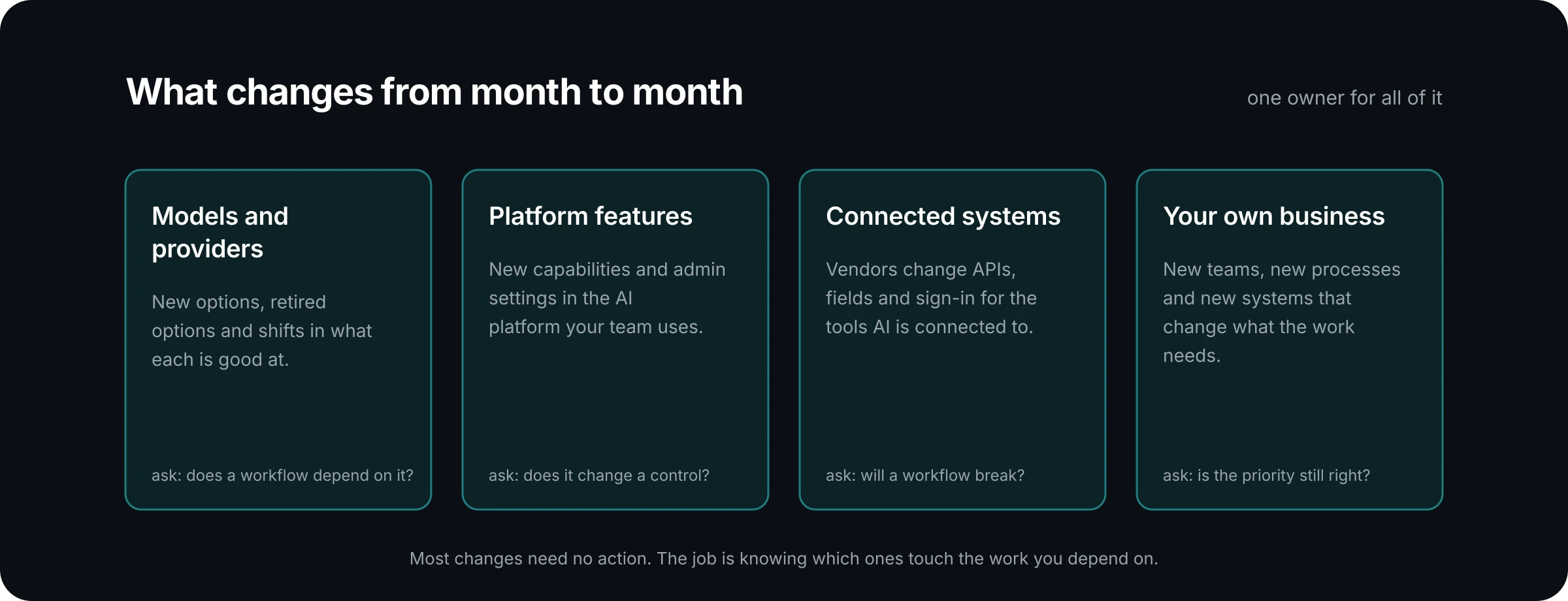
The fourth is the one teams forget. A reorganisation or a new line of business can make last quarter's priorities out of date faster than any model release.
How do you decide which changes matter?
Run each change through the same short filter. The questions are guidance, and they work in this order:
- Does it touch live work? Check the change against the workflows, connectors and controls you run today. If it touches none of them, you can usually stop here.
- What would it improve? Name the measure: quality, cycle time, cost or risk. If you cannot name one, the change is interesting and nothing more.
- What would it cost to adopt? Count the setup, the testing, the retraining and any change to approvals. New features are rarely free to absorb.
- Who decides? The owner who sets priorities makes the call, with the evidence in front of them.
Every change then lands in one of four outcomes. Act now if it protects live work, such as a sign-in change that would break a connector. Test it if it could improve a measure you care about, and make it a candidate for the next monthly improvement. Watch it if it is promising but unproven, and look again next month. Leave it if it does not touch your work.
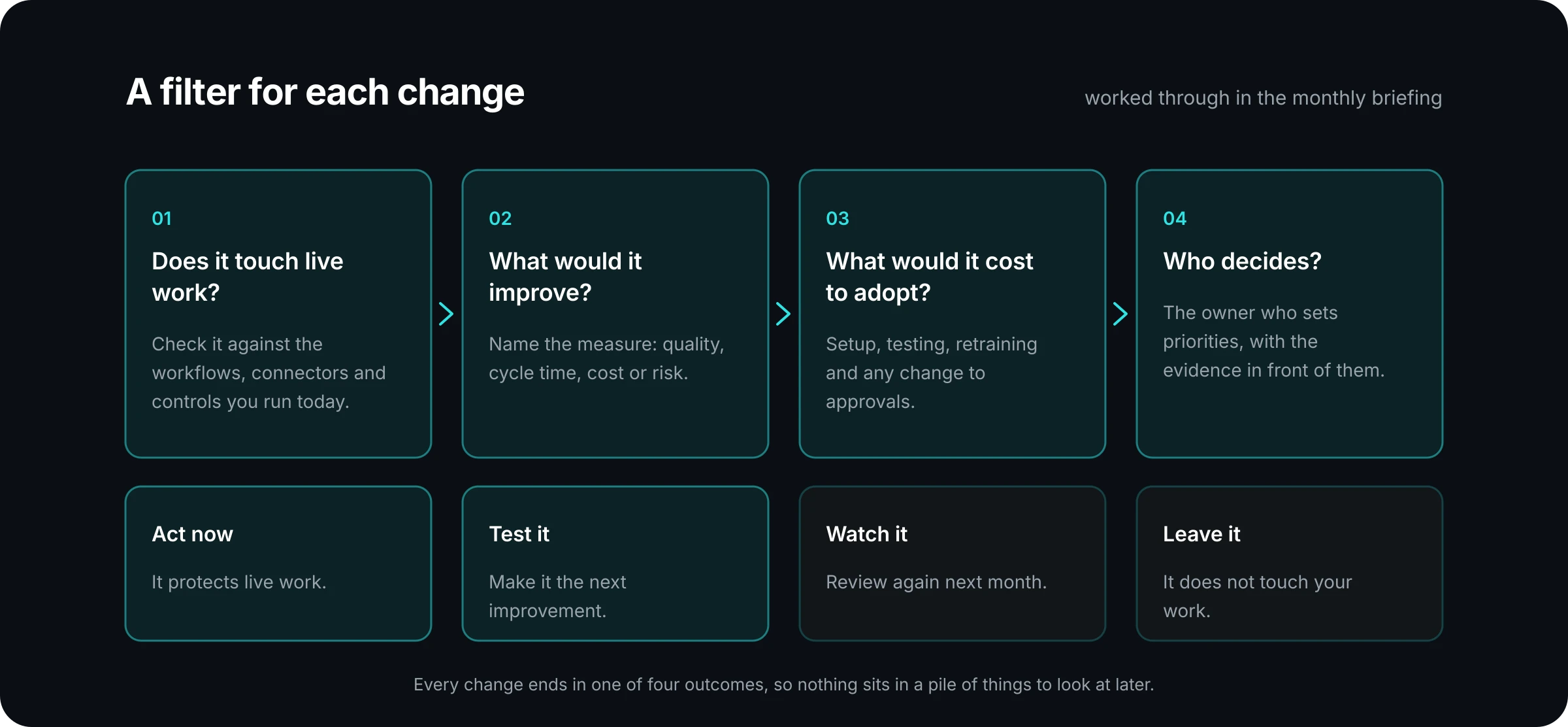
Writing down the outcome is what makes this work. A change that has been marked "leave it" does not need to be argued again next week.
What should a monthly briefing cover?
Keep it short and keep the shape the same. As guidance, a briefing for leaders has three parts.
What is new. A handful of changes that passed the first filter question, each in a sentence or two. Leave out everything that did not.
What it means for us. For each change, the workflow or control it touches and the outcome proposed: act, test, watch or leave.
What to do next. The decisions needed from the people in the room. If a change is going to be tested, say which workflow and what will be measured.
In Managed AI, the briefing sits alongside the monthly report, so the conversation about what is new happens next to the evidence of what is working. It also includes practical advice as OpenAI, Anthropic, open-source and other options change. The reporting and briefings page describes what arrives each month.
How do you keep people current without wearing them out?
Tie training to the work. A session on a new feature in the abstract is forgotten by Friday. A session that shows a service coordinator how the change affects the task they did this morning tends to stick.
Three practices help, all offered as guidance:
- Train by role. Different jobs need different things. Working sessions, guides and examples built around real responsibilities do more than a general update for everyone.
- Train when something changes. Link sessions to the improvement released that month, so people learn a new step when it becomes part of their job.
- Keep a door open. Many questions do not justify a session. A regular time when people can bring a problem and get an answer catches them. The Managed AI small business plan includes training and office hours.
Watch adoption after each change. If usage drops after a release, something about it did not land, and that is worth a conversation with the people affected.
What happens when a connected system changes?
This is the change most likely to break something. When a vendor alters an API, a field or a sign-in method, a workflow that ran well yesterday can stop today.
Two habits reduce the risk. First, keep a plain list of which workflows depend on which systems, so you know what a change touches. Second, tell whoever runs your AI before you change a connected system yourself. Under Managed AI, customers keep us informed before a connected system changes, and the midmarket plan includes a connector watch as vendors change.
The same list earns its keep when a change comes from your side. Replacing a ticketing tool or a CRM is a business decision, and its effect on AI workflows should be known before the cutover.
Where to go from here
Start with the list of what you depend on: the workflows, the systems each one touches, and who owns each. Name one person to own keeping up. Give them the filter and a monthly slot with the people who decide. That is enough to turn a stream of announcements into a short set of decisions.
If you would prefer that someone else owns it, this is part of what Managed AI is for. A dedicated contact who knows your setup brings you what matters and what to do about it. The what we run page sets out the scope, and the plans page shows how the service changes with the size of the business.
Talk to us about what is live today, and we will talk through what keeping it current should involve.